Home / Blog / Social Media Marketing
Social Media Marketing
How to Advertise on Instagram: A Step-by-Step Guide for Beginners
To advertise on Instagram, switch to a professional account, link a Facebook Page, then either boost a post from the app or build a campaign in Meta Ads Manager. Pick one goal, set your audience, budget and days, add your image or video and publish. A boost takes about five minutes. A full campaign takes about half an hour.
Key takeaways
- There are two ways to advertise on Instagram: boost a post from the app (about 5 minutes) or build a campaign in Meta Ads Manager (about 30 minutes).
- Pick one goal per ad. Trying to get likes, website visits and sales from the same ad usually gets you none of them.
- Start with Rs 300 to Rs 500 a day for 5 to 7 days, aimed at your own city, and judge the result on cost per enquiry, not likes.
- The picture and the first line of text decide most of your results. Targeting comes second.
What do Instagram ads actually mean
An Instagram ad is simply a post, Reel or Story that you pay to show to people who do not follow you yet. It looks like normal content, with a small “Sponsored” label and a button such as Message, Call or Learn more.
People searching “how to do Instagram ads” or “how to put ads on Instagram” are usually asking one of two things: how do I get my post in front of more people today, or how do I run proper campaigns that bring leads. Those are two different tools, and picking the right one saves money.
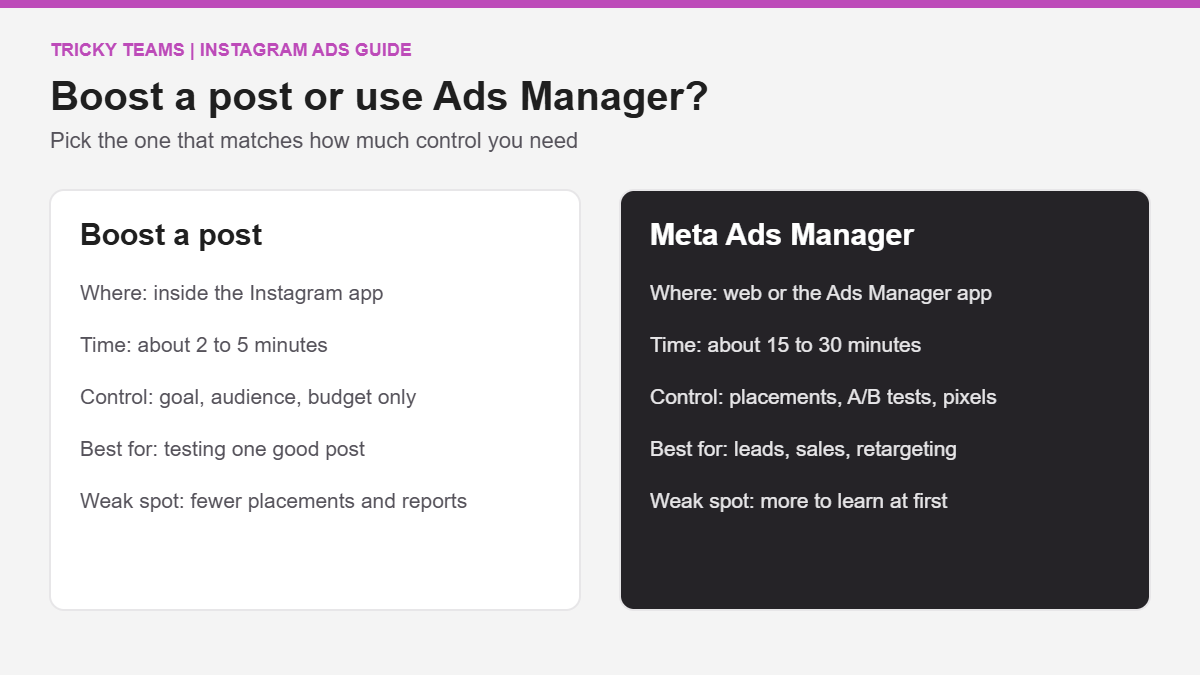
| Boost a post | Meta Ads Manager | |
|---|---|---|
| Where you do it | Instagram app | Computer or Ads Manager app |
| Setup time | About 2 to 5 minutes | About 15 to 30 minutes |
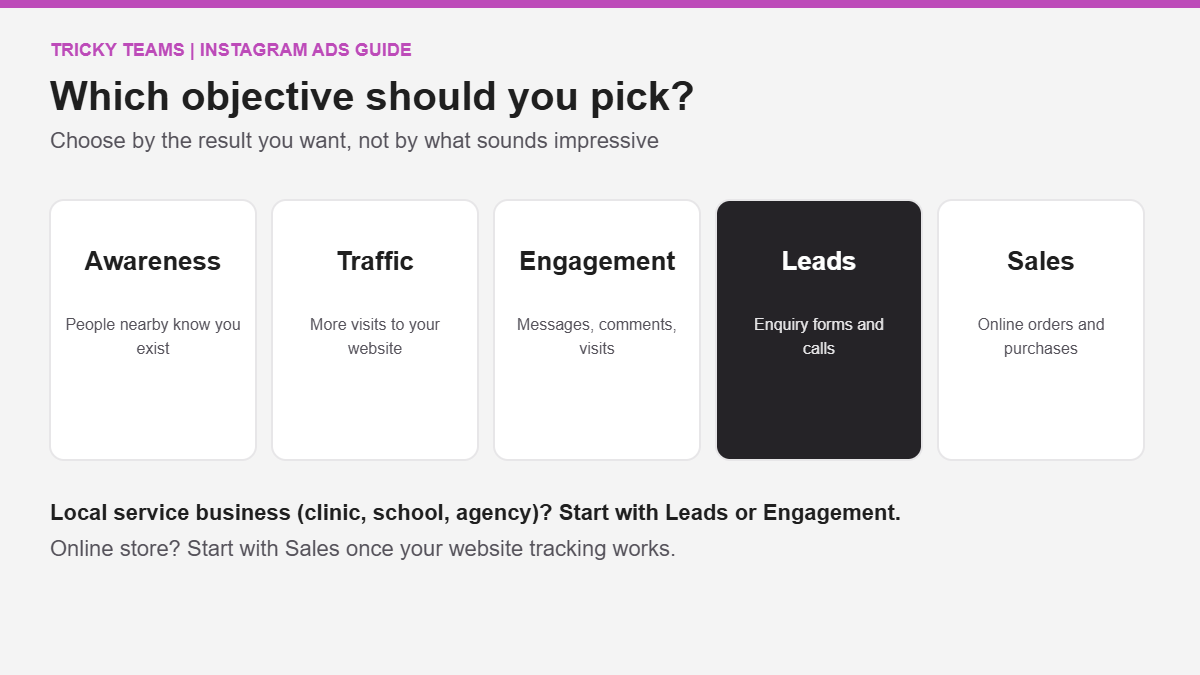
| Goals available | Profile visits, website visits, messages | Awareness, traffic, engagement, leads, sales |
| Best for | Testing a post that already works | Leads, sales, retargeting, A/B tests |
Our advice: boost one post this week just to see how it feels. If you plan to spend more than a few thousand rupees a month, move to Ads Manager. It is more work up front but you get far better reports and you stop paying for people who were never going to buy.
What you need before your first ad
Skip this section and you will get stuck halfway through, usually at the payment step. Sort these three things first.
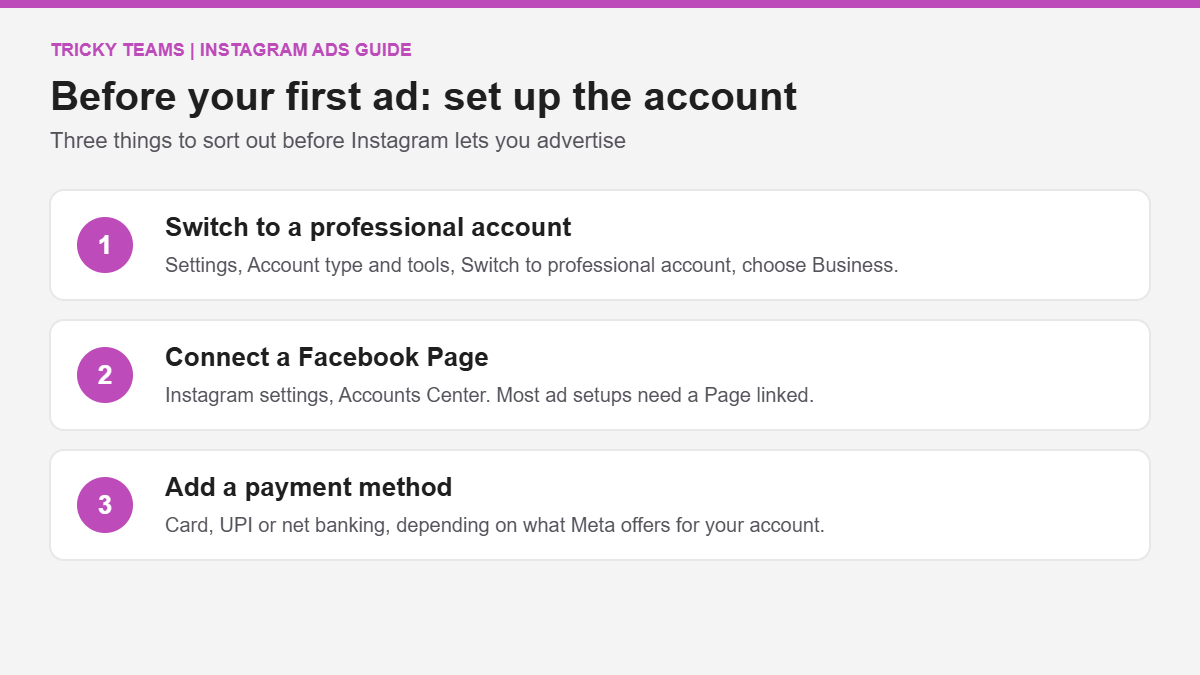
- A professional (business) Instagram account. In the app go to Settings, find Account type and tools, tap Switch to professional account and choose Business. It is free, and you can change back later.
- A Facebook Page linked to it. In Instagram settings open Accounts Center and connect your Page. Create a simple Page first if you do not have one.
- A way to pay. Meta shows the payment options available for your account when you set up billing. Add one before you start, so you are not hunting for a card with the ad half built.
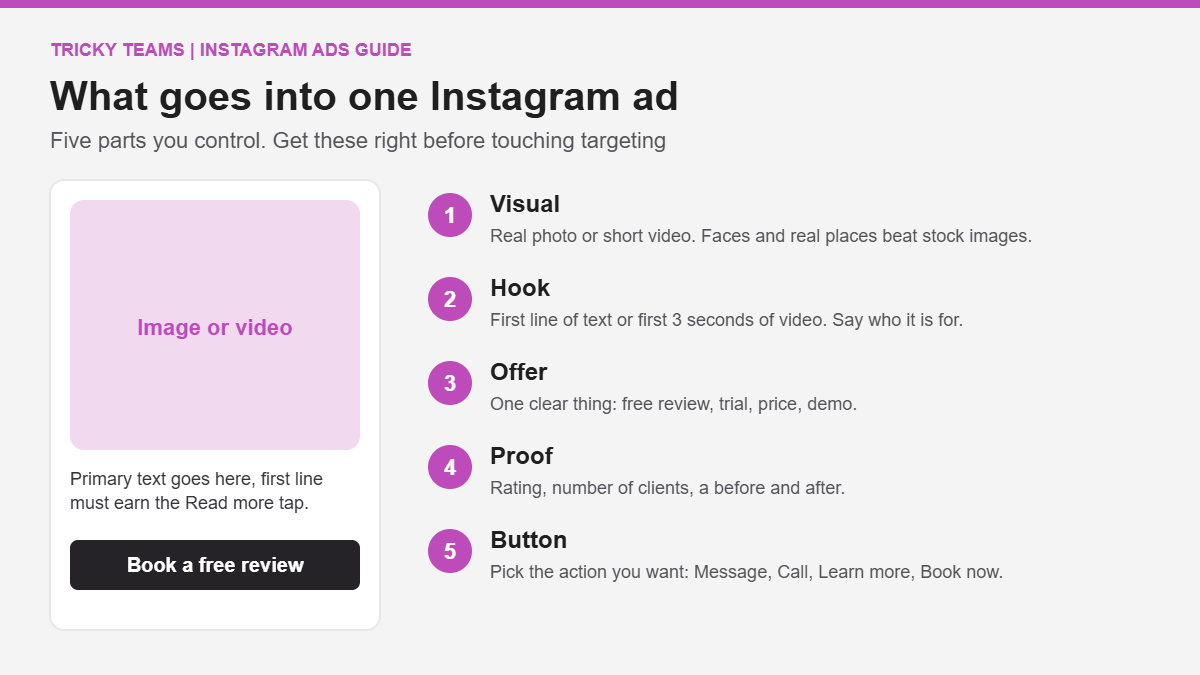
Also have ready: one clear photo or a 15 to 30 second vertical video, one line saying what you offer, and one action you want, such as “message us” or “book a visit”.
How to put ads on Instagram by boosting a post
This is the quickest way to put an ad on Instagram, and it is what most small shop owners should try first.
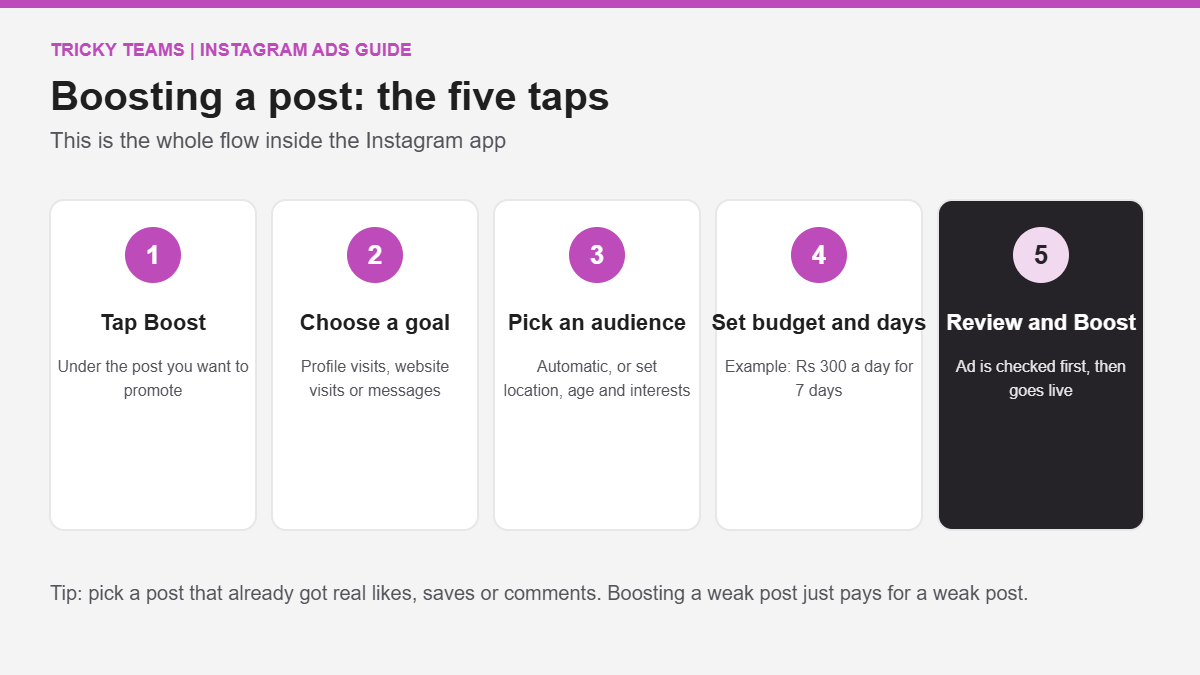
Step 1. Pick the right post
Open your profile and look at which post already got real reactions: saves, shares, comments from real customers. Boost that one. A post nobody liked organically will not suddenly work because you paid for it.
Step 2. Tap Boost
The button sits under the post. If you do not see it, your account is probably still personal, or the Page is not linked. Go back to the setup section above.
Step 3. Choose one goal
You will usually see three: more profile visits, more website visits, or more messages. A clinic or a boutique usually does best with messages, because a conversation is closer to a booking than a like. A business with a good website can choose website visits.
Step 4. Pick the audience
Choose automatic if you are unsure. If you know your customers, set the location to your city or a radius around your shop, then age range and a few interests. Keep it local. A saree shop in RS Puram does not need clicks from Delhi.
Step 5. Set budget and days, then boost
Rs 300 a day for 7 days is Rs 2,100 in total, and that is enough for a first test. Check the preview, add your payment method if asked, and tap Boost. The ad is reviewed before it goes live, which usually does not take long.
Good to know: once a boost is running you cannot freely change the audience, and editing the post can end the boost. If something is wrong, stop it and make a new one.
How to make Instagram ads in Meta Ads Manager
This is how to run Instagram ads properly. It is longer, but every step is a real decision about your money, so it is worth doing slowly the first time.
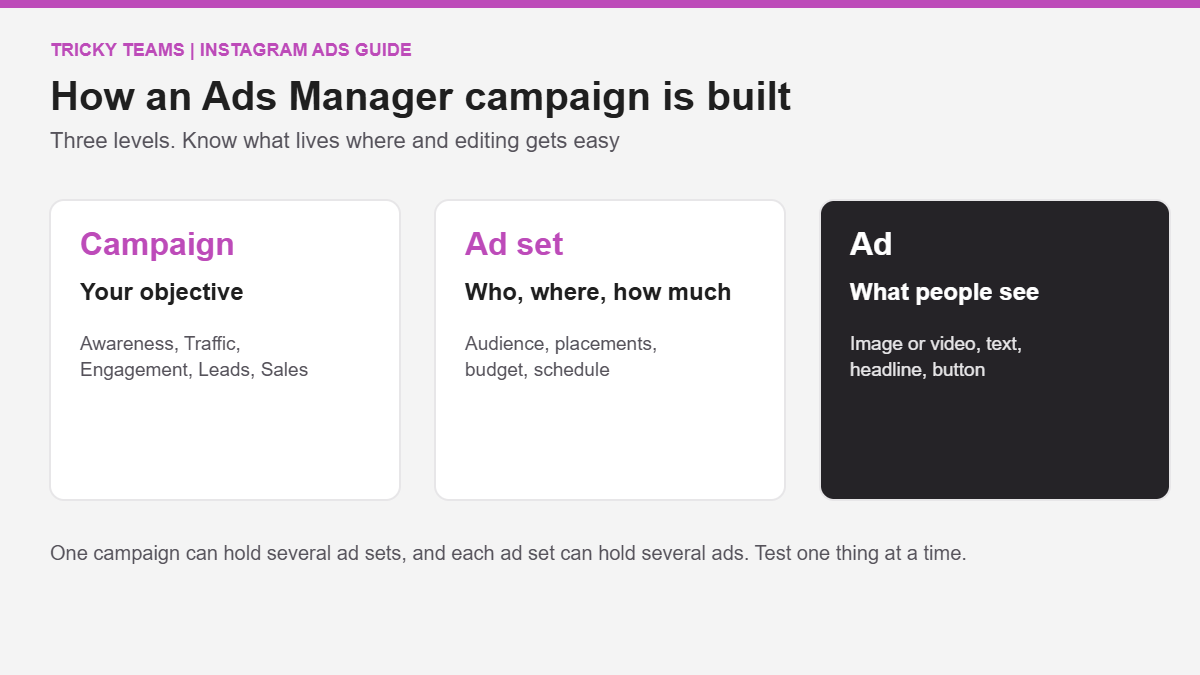
Step 1. Open Ads Manager and click Create
Go to Meta Ads Manager, choose the ad account linked to your business and click Create. Make sure your Instagram account shows as connected.
Step 2. Choose the objective
Meta asks what you want the ad to achieve. Be honest here, because the whole system optimises for whatever you pick.
Step 3. Build the audience (ad set)
- Location: your city or a radius. For Coimbatore businesses, 10 to 15 km around the shop is a sensible start.
- Age and gender: only narrow this if you truly serve one group.
- Interests and behaviours: add a few, not twenty. Broad audiences often work better than people expect, because Meta finds buyers from your creative.
- Placements: leave Advantage+ placements on for the first test, then review where the results came from.
- Budget and schedule: set a daily budget and an end date so the ad cannot run forever by accident.
Step 4. Create the ad itself
Choose your Instagram account as the identity, upload the image or video, write the text, add a headline and pick the button. This part decides more than any targeting trick.
Step 5. Review and publish
Check the preview for feed, Stories and Reels. Text cut off at the edges is the most common problem. Click Publish. The ad goes into review and, once approved, starts delivering.
How much should you spend
Meta sets the minimum, and you set the rest. What matters is how many results you can afford. Here is simple planning maths for a first month. The click costs are rough ranges reported by Indian agencies in 2026 and move a lot by industry, so use them to plan, not to promise yourself results.
| Daily budget | For 7 days | Rough clicks you might see | Good for |
|---|---|---|---|
| Rs 300 | Rs 2,100 | 70 to 400 at Rs 5 to Rs 30 | First boost test |
| Rs 500 | Rs 3,500 | 115 to 700 at Rs 5 to Rs 30 | Local lead test |
| Rs 1,000 | Rs 7,000 | 140 to 1,400 at Rs 5 to Rs 50 | Serious campaign |
Clicks are not customers. If 100 people click and 5 enquire, your cost per enquiry is your spend divided by 5. That number is the one to watch. Our digital marketing pricing guide shows how ad spend sits alongside management costs.
Ad copy examples you can adapt
These are samples to show the pattern, not results from a client. Swap in your own details.
- Dental clinic in Coimbatore: “Tooth pain that keeps coming back? Book a check-up at our Race Course clinic this week. First consultation Rs 200. Tap Message to pick a time.”
- Saree boutique: “New Kanchipuram arrivals, 20 pieces only. Send us a message with your colour and budget and we will send photos on WhatsApp the same day.”
- Coaching centre: “Class 12 board exams in 90 days? Join our free demo class on Saturday. Limited to 30 students. Message us to reserve a seat.”
Notice the pattern: who it is for, one clear offer, one next step. No paragraph about how great the company is. If you work in healthcare or finance, read the platform rules on claims first, because “guaranteed” language gets ads rejected. We cover the usual rules for healthcare, dental and finance businesses on those pages.
How to tell if your ad is working
Wait 3 to 5 days before touching anything. Then look at four numbers in Ads Manager:
- Cost per result: what one message, lead or sale costs you. This is the main number.
- Click-through rate (CTR): how many people who saw the ad clicked. A very low CTR usually means the picture or first line is weak.
- Frequency: how often the same person saw it. Past 3 to 4 in a week, people are tired of it. Swap the creative.
- Quality of enquiries: read the actual messages. Lots of clicks and no real enquiries means the offer or audience is off.
Change one thing at a time: first the creative, then the audience, then the budget. If you change all three, you will never know which one helped.
Seven mistakes that waste ad money
- Boosting a post nobody engaged with organically.
- Picking “likes” or “reach” when you actually want enquiries.
- Targeting the whole of India for a local business.
- Cramming text onto the image, which hurts delivery and gets ads rejected.
- Sending people to a slow website. Check yours with our free website speed checker first.
- Changing everything every day, so the system never learns.
- Stopping after three days because the first results look poor.
Do it yourself or get help
Doing your first boost yourself is a good idea, because you learn what the buttons do. Once you spend regularly, a few hours a week goes into creative, testing and reporting, and that is where most owners run out of time. At Tricky Teams we manage social media and digital marketing from Rs 8,000 per month, and your ad budget is paid directly to Meta so you always see where the money goes. If you would like us to look at your current account first, the review is free.
Want a team to run your Instagram ads for you? See our Instagram advertising agency page for how we plan, run and report them.
Frequently asked questions
How do I advertise on Instagram for beginners?
Switch to a professional account, link a Facebook Page, then boost one good post from the app. Choose a goal, an audience, a daily budget and the number of days, and tap Boost. Once that feels easy, move to Meta Ads Manager for more control over placements and targeting.
How do I put ads on Instagram without spending a lot?
Start with a small daily budget, roughly Rs 300 to Rs 500, for 5 to 7 days and put it behind a post that already performs well. Small tests are fine. Just do not judge the result after one day, because Meta needs a few days to find the right people.
How do I add an ad on Instagram (how to ad on Instagram)?
Open the post you want to promote on your profile and tap Boost, or create a new ad in Meta Ads Manager by clicking Create, choosing an objective, setting the audience and budget, and adding your image or video. Both routes end with a review before the ad goes live.
Do I need a Facebook Page to run Instagram ads?
For most setups, yes. A linked Facebook Page keeps everything in one place and unlocks Ads Manager. The Instagram app can sometimes boost a post without a Facebook ad account, but you lose reporting and control, so link the Page if you plan to keep advertising.
How much do Instagram ads cost in India?
You set the budget, so you decide. What you pay per click varies a lot by industry and competition. Indian agency benchmarks for 2026 quote anything from about Rs 5 to Rs 50 per click, with finance and real estate at the higher end. Treat those as a rough guide, not a promise.
What is the minimum budget for Instagram ads?
Meta sets a small platform minimum, and it can change. In practice, Rs 300 to Rs 500 a day gives Meta enough data to learn from. Below that you are mostly testing, which is fine for a first week but not for judging whether ads work for your business.
Is boosting a post the same as running an ad?
Not quite. A boost is a simplified ad made from an existing post, with fewer settings. An Ads Manager campaign lets you choose placements, build custom audiences, run A/B tests and track conversions. Boost is faster; Ads Manager is better for leads and sales.
How long should I run an Instagram ad before judging it?
Give it at least 3 to 5 days and enough spend to collect a few dozen results. Changing the audience or budget every day resets the learning and muddies the numbers. Change one thing at a time and wait.
Why was my Instagram ad rejected?
The usual reasons are too much text on the image, claims Meta treats as misleading (especially health and money), a landing page that does not match the ad, or a restricted category. The rejection notice names the policy. Fix that one thing and resubmit.
Can I target only my city, like Coimbatore or Chennai?
Yes. In the audience step you can pick a city or drop a pin and set a radius, for example 10 km around your shop or clinic. For a local business this is usually the single most useful setting, because it stops you paying for clicks from people who can never visit.
Do I need a website to advertise on Instagram?
No. You can send people to your profile, to a message chat, or to a lead form inside Instagram. A website helps when you want sales or tracking, but plenty of local businesses get enquiries from messages alone.
Should I run ads on Reels, Stories or the feed?
If you are unsure, let Meta place the ad automatically across feed, Stories and Reels for the first test, then check which placement gave the cheapest results and lean into it. Always make a vertical 9:16 version, since Stories and Reels are full screen.
Keep reading
Want us to look at your Instagram ads?
Send us your profile and we will tell you what to fix first, free of charge.